Scope
Network segmentation sounds like a technical jargon term. It isn't. It's the single most important control for stopping ransomware, insider threats, supply chain attacks, and lateral movement by attackers once they've breached your network.
The principle is simple: not all systems should be on the same network. Separate your critical systems from your everyday systems. Separate your administrative access from your user access. Separate your operational technology (machinery, sensors, controllers) from your business IT. Use firewalls and access controls to limit what can communicate with what.
The reality in most small businesses: everything is on one network. A finance employee's laptop can access the file server, the accounting system, the customer database, the backup systems, the printer, and potentially the factory floor machinery or point-of-sale systems. If that one laptop is compromised, an attacker has access to everything.
This article covers what network segmentation is, why it stops attacks, how to implement it for small businesses, and how it connects to cyber insurance requirements and compliance standards.
The Problem: The "One Shared Network" Trap
Most small businesses operate this way:
- One network for everything—employee laptops, servers, printers, phones, IoT devices, payment systems, cameras, and sometimes operational machinery
- One firewall protecting the perimeter
- One set of credentials for administrative access
- Everyone can potentially reach everything (by design, for convenience)
This works fine—until something goes wrong.
Scenario 1: Ransomware Attack
An employee clicks a phishing link. Malware installs on their laptop. Within minutes, the ransomware has encrypted your file server, database backups, accounting system, and customer records. Everything. Why? Because the employee's laptop and the backup servers are on the same network, and the backup systems didn't have separate credentials or access restrictions.
Scenario 2: Insider Threat or Accidental Damage
A disgruntled employee or careless contractor with access to one system suddenly has access to all systems. They could delete critical data, steal customer information, or cause damage across multiple systems—not because they were granted that access, but because everything is on the same network.
Scenario 3: Lateral Movement by Attacker
An attacker compromises a low-privilege account (maybe the WiFi password was weak, or an employee's email was phished). They land on your network with access to one system. From there, they move laterally—using network reconnaissance tools to map other systems, escalate privileges, and access critical data. On a flat network, this is trivially easy. On a segmented network, it's nearly impossible because each segment has separate access controls.
Scenario 4: Vendor or Third-Party Compromise
A contractor's laptop or a vendor's device is compromised. They connect to your WiFi with their malware. On a flat network, the malware now has access to your systems. On a segmented network, the contractor's device is isolated in a guest network with no access to critical systems.
What Network Segmentation Actually Is
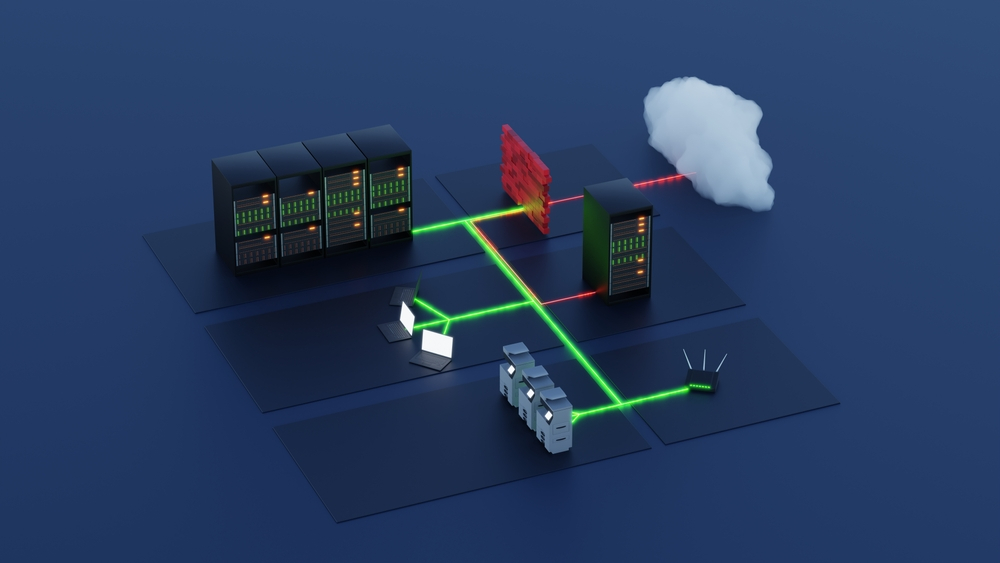
Network segmentation is dividing your network into separate zones and controlling what can communicate between zones.
Think of it like building architecture. Instead of one large open floor with everything visible and accessible, you create separate rooms, hallways, and locked doors. An employee in the finance room can do their job without accessing the IT closet or the manufacturing floor. A visitor in the conference room doesn't have access to the server room.
In networking terms:
- Network segments (VLANs or subnets): Separate networks for different purposes—user networks, administrative networks, guest networks, operational technology networks, etc.
- Firewalls between segments: Rules controlling what traffic is allowed between segments. By default, deny everything. Only allow what's necessary.
- Separate credentials: Access to different segments requires different authentication. Administrative access is not the same as user access.
- Monitoring: Log and alert on traffic crossing segment boundaries, especially unusual access patterns.
How It Stops Attacks
When you segment your network:
- Ransomware can't spread. If an infected user laptop is on a user segment, and backups are on a protected administrative segment, the ransomware can't reach the backups. You can restore from clean backups and recover without paying ransom.
- Attackers can't move laterally. If an attacker compromises one system, they're trapped in that segment. They can't access other systems without crossing a firewall—which requires either stolen credentials for that segment or breaking through security controls designed to stop exactly this kind of movement.
- Vendor compromise doesn't become yours. If a contractor's device is on a guest network, malware on that device can't access your financial systems, customer data, or backups.
- Insider threats are contained. An employee with access to one system can't automatically access everything. Privilege escalation requires additional authentication or breaking through segment boundaries.
Segmentation Strategies for Small Businesses
You don't need to be a networking expert to implement segmentation. Start simple. Most small businesses benefit from four basic segments:
1. User Network (General Staff Laptops and Devices)
Employee laptops, desktop computers, phones, and tablets that access normal business applications. This is where most people work. It's the segment most likely to get infected with malware or compromised via phishing.
Access from this segment to critical systems (database, file server, backup systems) should be restricted and monitored.
2. Administrative Network (Servers, Backups, Sensitive Systems)
This segment contains your most critical systems:
- File servers and databases
- Backup systems and recovery infrastructure
- Accounting and financial systems
- Customer records and personally identifiable information
- Administrative accounts and privileged access systems
Access to this segment is restricted. Only administrators and authorized systems can access these resources. A regular user laptop should not have direct access to this segment—access goes through application servers or dedicated administrative terminals.
3. Guest Network (Contractors, Visitors, BYOD)
Contractors, vendors, customers, and employees bringing personal devices connect to this isolated network. It has internet access but no access to internal systems. It's like giving someone WiFi at a coffee shop—they can browse the internet, but they can't access your filing cabinets.
4. Operational Technology (OT) Network (If Applicable)
If your business operates machinery, manufacturing equipment, HVAC systems, point-of-sale systems, or other connected devices, these should be on a separate network from your business IT.
OT networks have different requirements: they prioritize uptime and safety over security updates (because updates sometimes require downtime). They should be isolated, monitored, and protected with strong authentication.
Example Segmentation for a 10-Person Accounting Firm:
- User segment: 8 employee laptops for general work
- Administrative segment: 1 file server, 1 backup system, 1 accounting software server, all with restricted access
- Guest segment: WiFi for clients visiting the office
- Firewall rules: Users can access administrative systems through specific applications (email, file sharing), but not directly. Backups are not accessible from user segment.
Common Segmentation Mistakes
Mistake 1: Creating Segments Without Access Control
Segmentation only works if you enforce access controls between segments. Simply putting systems on different networks isn't enough. You need firewall rules that explicitly allow or deny traffic between segments.
A firewall rule should be: "Allow user segment to access file server on port 445 (SMB), deny everything else." Not "allow user segment to access administrative segment—that's too permissive.
Mistake 2: Overcomplicating the Design
You don't need 20 segments. Most small businesses benefit from 3-4 segments and clear, simple rules. Complexity is the enemy of security—overly complex segmentation is hard to maintain, easy to misconfigure, and creates frustration that leads to circumvention.
Mistake 3: Forgetting Administrative Access
Administrators need access across segments to do their job. But that doesn't mean they should use their daily account with broad access. Use privileged access management: administrators have a regular account for normal work and a separate administrative account for privileged operations. The administrative account is subject to additional authentication and monitoring.
Mistake 4: Not Monitoring Segment Traffic
Set firewall rules but don't monitor whether unusual traffic is crossing segment boundaries. An attacker probing for routes between segments or attempting lateral movement should trigger alerts.
Mistake 5: Excluding Wireless and Remote Access
Segmentation only works if it covers all access methods. Remote access (VPN), wireless networks, and guest WiFi must also be segmented. An employee connecting from home should be in the user segment, not on the administrative segment.
Implementation for Small Businesses
Step 1: Audit Your Current Network (Week 1)
Document what you currently have:
- How many devices and systems do you have?
- Which systems are critical (databases, backups, financial systems)?
- Which systems need to communicate with each other?
- Do you have different user types (regular employees, administrators, contractors)?
Step 2: Define Your Segments (Week 1-2)
Create a simple diagram showing your target segments and what systems belong in each:
- User segment: [list systems]
- Administrative segment: [list systems]
- Guest segment: [list systems]
- OT segment (if applicable): [list systems]
Step 3: Implement in Phases (Weeks 3-12)
Start with your most critical systems. Don't try to segment everything at once.
Phase 1 (Weeks 3-4): Protect your backup systems. Move backups to an isolated network segment. Backup systems should not be accessible from user devices or regular administrator accounts. This is your recovery lifeline—protect it.
Phase 2 (Weeks 5-6): Separate administrative access. Create a dedicated administrative segment or administrative account tier. Administrators accessing this segment use different credentials and multi-factor authentication.
Phase 3 (Weeks 7-10): Implement guest WiFi. Contractors, vendors, and guests connect to an isolated guest network with no access to internal systems.
Phase 4 (Weeks 11-12): Segment operational technology (if applicable). Manufacturing equipment, point-of-sale systems, or other connected machinery goes on an isolated OT segment.
Step 4: Establish Monitoring and Rules
For each segment boundary, define and log firewall rules:
- What traffic is allowed from user segment to administrative segment?
- What traffic is allowed from guest segment? (Usually just internet access)
- What traffic is allowed from administrative segment to OT segment?
- Alert on any traffic that violates these rules
Step 5: Test and Document
After implementation:
- Test that normal business operations still work
- Test that restricted traffic is actually blocked
- Document your segmentation design and firewall rules
- Train staff on how to request access if they need it
Cost and Complexity Reality Check
Network segmentation sounds expensive and complex. For small businesses, it doesn't have to be.
What You Might Already Have
- Router/firewall: Most small businesses have a firewall. Modern firewalls (Ubiquiti, Meraki, Fortinet, Sophos) support VLANs and access control lists.
- Wireless access points: Most business-grade WiFi supports guest networks (which is a form of segmentation).
- Switches: Modern switches support VLANs. You may not need to buy new hardware.
Cost Estimate for a 10-20 Person Small Business:
- If you already have modern equipment: $0-500 (configuration time and potentially one managed switch)
- If you need new equipment: $1,500-5,000 (managed switch, upgraded firewall, access points with guest network capability)
- Ongoing management: ~5-10 hours per quarter to monitor rules and update access controls
The cost is minimal compared to the cost of ransomware (which averages $250,000+ in recovery costs for small businesses).
Segmentation and Cyber Insurance
Network segmentation is increasingly listed as a requirement or preferred control in cyber insurance policies. Insurers recognize that segmentation dramatically reduces:
- Ransomware damage (backups are protected)
- Scope of breach (attacker can't access everything)
- Recovery time (isolated segments can be restored independently)
Organizations with documented network segmentation often receive lower premiums and are more likely to have claims approved.
Segmentation and Compliance Standards
If your business handles payment card data (PCI DSS), protected health information (HIPAA), or personal data subject to GDPR or CCPA, network segmentation is often a compliance requirement. These standards require that systems handling sensitive data be isolated and protected.
Implementing segmentation positions your organization to meet these requirements and demonstrates commitment to data protection.
Common Questions
Q: Doesn't segmentation slow down performance?
A: No. If you implement it correctly, segmentation has minimal performance impact. Traffic within a segment (which is the bulk of your traffic) is unaffected. Traffic crossing segment boundaries goes through a firewall, but modern firewalls handle this with negligible latency.
Q: What if an employee needs to access multiple segments?
A: They use VPN or a privileged access workstation. They don't use their daily laptop to jump between segments. Administrative access is authenticated separately and monitored.
Q: Can my IT provider help with this?
A: Yes. If you don't have internal IT expertise, an MSP (managed service provider) can design and implement segmentation for you. This is a one-time engagement (design and implementation) followed by ongoing monitoring.
Q: What if I have legacy systems that don't support segmentation?
A: Even legacy systems can be segmented. You put them on a separate network segment with dedicated access controls. If they must communicate with modern systems, that communication goes through a secure gateway or application layer (not direct network access).
What to Do Now
- This week: Draw a simple diagram of your current network. What systems do you have? Are they all on the same network?
- This week: Identify your most critical systems (backups, financial data, customer records). These should be your first priority for segmentation.
- Next week: Contact your IT provider or network administrator and ask about current network architecture. Can your firewall and switches support VLANs and access control lists?
- Next 30 days: Get a quote for segmentation implementation. If it's expensive, ask about phased implementation (backup protection first, guest WiFi second, administrative segmentation third).
- Next 90 days: Implement segmentation for your most critical systems. Start with backup protection and guest WiFi—these are high-impact and relatively easy.