What NIST Released
On November 2, 2026, the National Institute of Standards and Technology (NIST) published Small Business Cybersecurity: Non-Employer Firms (NIST Cybersecurity White Paper 50). It is written for businesses with no employees other than the owner: sole proprietors, freelancers, single-member LLCs, independent contractors, and gig workers. NIST calls them "non-employer firms"; most of us call them solopreneurs.
That is a very large audience. According to the U.S. Small Business Administration, 81.9% of the country's 34.8 million small businesses have no paid employees, which is more than 28 million businesses. The guide assumes no prior cybersecurity knowledge, and NIST notes it is also useful for businesses with only a few employees or very simple IT.
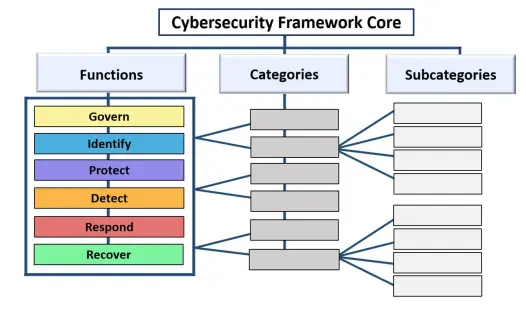
It replaces Small Business Information Security: The Fundamentals (NIST IR 7621), first published in 2009 and last revised in 2016. The new version is narrower, focused on cybersecurity rather than all of information security, and is built on the NIST Cybersecurity Framework (CSF) 2.0.
What's in the Guide
- A short primer on why cybersecurity matters to a one-person business, how to think about risk, and when to bring in outside help.
- Actions organized by the six CSF 2.0 Functions: Govern, Identify, Protect, Detect, Respond, and Recover. Each action has four parts: what to do, why it matters, how to get started, and what to add as the business grows.
- Focused guidance on phishing and ransomware, the two threats NIST singles out as most common.
- A separate spreadsheet of worksheets for tracking legal and contractual requirements, inventorying assets and risks, planning incident response and recovery, and recording which accounts have strong passwords and multi-factor authentication.
- Three worked examples: an intellectual property attorney, a home-workshop e-commerce seller, and a marketing consultant with clients around the world.
NIST's Nine Starting Actions
The guide opens with a short list of actions that "can significantly reduce cybersecurity risks":
- Turn on phishing-resistant multi-factor authentication wherever it's offered, starting with email, banking, file storage, your password manager, and critical cloud services.
- Learn to recognize the signs of phishing and ransomware.
- Do everyday work in a standard user account, not an administrator account.
- Use strong, unique passphrases of at least 15 characters, ideally in a password manager, and use passkeys where you can.
- Inventory the devices, accounts, data, and services your business depends on.
- Set up backups, protect them, and test that they restore.
- Keep software updated on every device and application.
- Keep a list of who to call in an incident (law enforcement, legal counsel, incident response help), with a paper copy.
- List the legal, regulatory, and contractual requirements that affect your cybersecurity.
None of these require a security background or a big budget. Most of them are an afternoon's work, or a setting you change once.
Three Points Worth Noticing
Separate business from personal. Solopreneurs often run the business from the family laptop and a personal email account. NIST recommends keeping business and personal devices apart where possible and, if a device must be shared, giving family members their own accounts with no access to business data.
Outsourcing doesn't transfer responsibility. Hiring an IT provider or using a cloud platform is often the right call, but NIST is clear that you remain accountable for your systems and your clients' data. Put security expectations in your contracts and check them periodically.
AI tools count as assets too. The guide (which uses the federal government's new term "super intelligence" for AI) recommends listing every AI tool you use, checking its data retention and training settings before entering client or confidential information, and reviewing AI-generated content before you rely on it. See AI Tools for Small Business for practical guidance.
Where to Start This Week
- Secure your email first. It's the key to resetting every other account. Turn on a passkey or an authenticator app, and check the recovery email and phone number. Our Email Account Protection guide walks through it.
- Make a one-page inventory. List your devices, your important accounts, and where your client data lives. For each account, note whether it has a unique password and MFA.
- Test one restore. Recover a file from your backup to prove it works.
- Write down your contacts. Your bank's fraud line, your IT help, your insurer, and the FBI's Internet Crime Complaint Center (ic3.gov). Print it.
The guide itself is free, and it's 33 pages with plenty of white space, so it's worth reading in full. NIST is careful to say it isn't a checklist or compliance standard; it's a starting point you adapt to your business. If you'd like to see where you stand first, the free CSFSafe Cybersecurity Checkup takes a few minutes and is organized around the same CSF Functions.
References
- NIST CSWP 50 - Small Business Cybersecurity: Non-Employer Firms (November 2, 2026)
- NIST CSRC - Publication record and supplemental worksheets (Appendices D-J)
- NIST News - Self-Employed? Solopreneur? NIST Has a Cybersecurity Guide Just for You
- NIST Small Business Cybersecurity Corner
- CSFSafe - NIST CSF 2.0: How It Works for Small Businesses