Scope
Backups are mentioned constantly in cybersecurity guidance, insurance requirements, and incident response plans. Yet most small businesses don't test them until they need them. By then, it's often too late.
Untested backups were cited as a reason for claim denial in 26% of data breach insurance claims. Ransomware attackers specifically target backup systems because they know that restoring from backups is the fastest path to recovery. If your backups are vulnerable, your incident response plan fails.
This article covers the critical difference between "having backups" and "being able to recover," the 3-2-1 backup rule for small businesses, how to test recovery before you need it, ransomware-specific backup considerations, and how backup strategy connects to both cybersecurity and business continuity.
Why Backups Fail: The Real Numbers
Backup failures are remarkably common, and most organizations don't discover the problem until they try to recover.
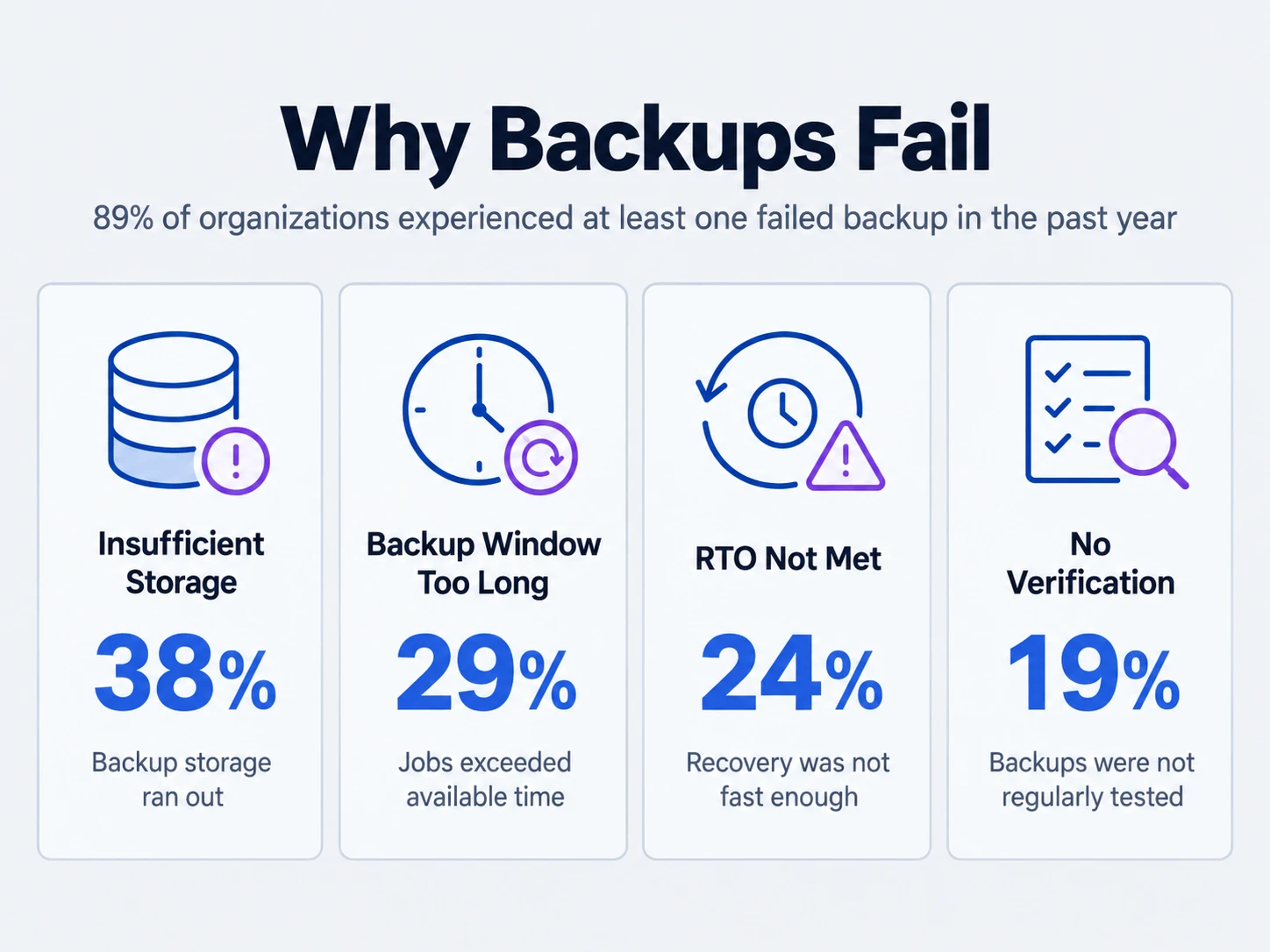
According to Veeam's 2025 Backup Trends Report, 89% of organizations experienced at least one failed backup in the past year. Among those failures:
- 38% were due to insufficient backup storage
- 29% resulted from backup windows that exceeded available time
- 24% involved inability to meet recovery time objectives
- 19% were caused by lack of backup verification processes
When an organization actually needs to restore, 29% report that restoration took longer than expected, and 22% discovered they couldn't restore everything they thought they had backed up.
The cost of backup failure is enormous. Organizations that discovered backup failures during actual recovery incidents reported an average cost of $2.3 million per incident due to extended downtime, data loss, and recovery expenses. For small businesses, this often means permanent closure.
The 3-2-1 Backup Rule: The Foundation
The 3-2-1 rule is a simple guideline: maintain 3 copies of your data, on 2 different media types, with 1 copy stored offsite.
Here's what that looks like for a small business:
- Copy 1 (Production): Your live files on your production systems (servers, cloud storage, local machines)
- Copy 2 (Primary Backup): Daily incremental backups to local NAS or cloud backup service
- Copy 3 (Offsite/Immutable): Weekly or monthly copies to external media or cloud storage in a different region, with immutability enabled (cannot be deleted or modified for a set retention period)
The different media types matter because different failure modes affect different storage: ransomware can encrypt local backups, data center failures can destroy on-site storage, and cloud service outages can temporarily make cloud-only backups inaccessible. Spreading copies across media types protects you from any single failure mode.
For small businesses specifically: You may not need enterprise-scale complexity. A practical 3-2-1 for most SMBs looks like:
- Daily cloud backups (Backblaze, Carbonite, or your SaaS vendor's backup features)
- Weekly local NAS backups with immutable snapshots enabled
- Monthly manual exports to external hard drive stored offsite (at owner's home, safety deposit box, or alternate location)
This approach costs under $500/month for a 10-person business and protects you from ransomware, hardware failure, accidental deletion, and data center outages.
RTO and RPO: The Metrics That Matter
Recovery Time Objective (RTO) and Recovery Point Objective (RPO) are business metrics that determine your backup strategy.
RTO (Recovery Time Objective) is how long you can tolerate being without a system. If you're a web-based business, RTO might be 4 hours—after that, you're losing significant revenue. If you're a law firm doing document review, RTO might be 24 hours. If you're a consulting firm, RTO might be 48 hours.
RPO (Recovery Point Objective) is how much data loss is acceptable. If you accept a 24-hour RPO, you're saying "we can afford to lose one day's worth of work." If you need zero RPO, you need continuous replication (expensive). Most small businesses operate with an 8-24 hour RPO.
How to define your RTO and RPO:
- List your critical systems (email, accounting, customer database, documents)
- For each, ask: "How much revenue do we lose per hour if this is down?" and "How much work can we afford to repeat?"
- Set RTO based on business impact (shorter RTO = more expensive to achieve)
- Set RPO based on transaction volume (more frequent backups = lower RPO = higher cost)
For a 10-person business, practical targets are typically: RTO of 8–24 hours, RPO of 4–8 hours (so daily backups). For critical systems like accounting, you might target 4-hour RTO and 1-hour RPO (hourly backups).
Testing and Verification: The Part Most Businesses Skip
This is the most critical section. An untested backup is assumed to be broken. You won't know it's broken until you actually try to restore—and by then, you're in an emergency with no safety net.
What "testing" means:
- Restore a full backup to an isolated test environment and verify that all data is present and readable
- Restore individual files and confirm they work
- Verify that applications can connect to restored databases
- Check that restored systems boot correctly and remain operational
- Time the restoration process to ensure it fits within your RTO
How often to test:
- Critical systems (accounting, customer database, email): Test monthly
- Important systems (file servers, documents): Test quarterly
- Standard systems: Test annually at minimum
- After any major system change: Always test immediately
A practical testing plan for small businesses:
- Month 1: Test accounting system restoration (1-2 hours)
- Month 2: Test email system restoration (1-2 hours)
- Month 3: Test file server restoration (1-2 hours)
- Month 4: Repeat the cycle
This quarterly rotation ensures every critical system gets tested at least quarterly. Document results in a simple spreadsheet: system name, date tested, duration, any issues found, and resolution.
Common issues discovered during testing:
- Backups incomplete (certain file types excluded, databases truncated)
- Restoration takes longer than RTO allows
- Restored data is corrupted or truncated
- Backup credentials expired or changed
- Backup storage is full or nearly full
- Network bandwidth insufficient for timely restoration
If you discover issues during testing, you've succeeded—you found them when you have time to fix them, not during a ransomware attack.
Ransomware-Specific Backup Considerations
Ransomware specifically targets backup systems because attackers know that restoring from backups bypasses their encryption and is the fastest recovery path. If your backups are accessible to the same credentials and network access as your production systems, ransomware will find and encrypt them.
How ransomware targets backups:
- Lateral movement to backup storage using stolen credentials
- Exploiting misconfigured network access (backup storage on same network with weak segmentation)
- Deleting backup versions after encryption to prevent rollback
- Exfiltrating backup catalogs to identify high-value data targets
Protections against ransomware targeting backups:
- Immutable backups: Enable write-once, read-many (WORM) mode on backup storage so even an attacker with admin credentials cannot delete or modify backups during the retention period
- Air-gapped backups: Store backup copies on media that is not connected to your network (external drives, tape storage) and only connect them when restoration is needed
- Separate credentials: Use backup-specific user accounts with minimal permissions, not production admin accounts
- Network segmentation: Isolate backup storage on a separate network segment with firewall rules restricting access from production systems
- MFA on backup accounts: Require multi-factor authentication for anyone accessing backup systems
- Backup monitoring: Alert if backup jobs fail, if storage capacity drops suddenly, or if deletion attempts occur
Many ransomware groups specifically look for backup systems that are accessible from compromised user accounts. Veeam's research shows that 47% of organizations experienced ransomware that targeted their backups. In many cases, those organizations couldn't recover because backups were deleted or encrypted along with production data.
Backup Tools and Services for Small Businesses
You don't need enterprise backup software. Here are practical, affordable options:
Cloud Backup Services (Daily automated backups):
- Backblaze: $7/month per user for unlimited cloud backup. Good for laptops and servers. No local control, but simple and affordable.
- Carbonite: $6–12/month depending on plan. Similar to Backblaze. Includes ransomware restore (version history recovery).
- Acronis Cyber Protect: $10–15/month per user. Includes backup, antimalware, and ransomware recovery in one package.
- Microsoft 365 Backup: If using Microsoft 365, third-party backup services (Veeam, Acronis) add protection for Exchange, SharePoint, and OneDrive at $3–8/month per user.
NAS (Network Attached Storage) for Local Backups:
- Synology NAS: $300–1200 for 2–4 bay models. Built-in backup software, immutable snapshots, and simple management. Scales with your business.
- QNAP NAS: Similar pricing to Synology. More advanced features for larger environments.
- Western Digital My Cloud: $200–400 for basic NAS. Simpler management than Synology/QNAP but fewer advanced features.
SaaS Vendor Backups:
- Microsoft 365: Includes 30-day recycle bin, but third-party backup strongly recommended for legal/regulatory compliance
- Google Workspace: Similar to Microsoft 365—built-in retention but limited recovery options
- Mailchimp, Shopify, etc.: Most SaaS platforms don't guarantee backup restoration on failure—third-party backup or export is essential
A practical small business backup stack ($300–500/month for 10-person business):
- Cloud backup service (Backblaze): $70/month for 10 users
- NAS with immutable snapshots (Synology, amortized): $40/month
- External USB drives for offsite (manual monthly): $20/month
- Microsoft 365 third-party backup (if applicable): $60/month for 10 users
- Total: $190/month (less than the cost of one ransomware claim or one week of downtime)
Backup Policy and Documentation
Your backup policy should answer these questions:
- What gets backed up and why?
- How often are backups taken?
- How long are backups retained (1 month, 1 year, indefinitely)?
- How are backups tested?
- Who can access backup systems?
- What is the plan if backups are corrupted or deleted?
- What is the restoration procedure for different types of failures?
Document this in a simple one-page policy document. Review it annually and after any major system change. Share it with your team so people understand why backups matter.
Most importantly: if you cannot restore, you do not have a backup. Test it. Verify it. Document it. Make it part of your business continuity plan.
Backup and Insurance Claims
If you file a cyber insurance claim after a ransomware attack or data breach, insurers will ask for evidence of your backup strategy:
- Do you have backups? Where are they stored?
- When were backups last tested?
- Are backups immutable or air-gapped?
- How long did recovery take?
- How much data loss occurred?
If your backups were accessible to the same compromised credentials as production systems, or if you couldn't restore quickly, your claim will be denied or reduced. 26% of cyber insurance claims were denied specifically because backups were not tested or were not available for recovery.
Having a backup policy document, testing logs, and restoration procedures in place dramatically increases your chances of claim approval.
Backup and CSFSafe Essentials
Backup and recovery is foundational to the CSFSafe Essentials framework, which defines the minimum controls every small business needs. Specifically:
- Asset management: You cannot back up what you don't know exists. Maintain an inventory of systems and data that need protection.
- Automated updates: Backup systems themselves need to be current and patched to avoid exploitation.
- Access control: Backup systems need separate credentials and network isolation to prevent ransomware lateral movement.
- Testing and incident response: Regular restoration testing is your best defense against incidents. It proves your recovery capability and identifies gaps before you need them.
Organizations that implement CSFSafe Essentials consistently report faster recovery, fewer insurance claim denials, and lower breach costs.
What to Do Now
- Today: Define your RTO and RPO for critical systems. Write them down.
- This week: Document what you're currently backing up, how, and where. Be honest about what you don't know.
- This month: Implement a basic 3-2-1 strategy: cloud backups, local NAS with snapshots, and monthly external drive backups.
- Next month: Test restoring one critical system. Document the results. Fix any issues found.
- Ongoing: Rotate monthly restoration tests. Document every test. Review results quarterly.
Backup and recovery is not a one-time project. It's an ongoing practice that requires testing, documentation, and regular review. But the investment is small compared to the cost of discovering you can't recover when you actually need to.
References
- Veeam. (2025). Backup & Disaster Recovery Trends Report 2025. Key statistics on backup failures, testing practices, and recovery costs.
- Security.org. (2024). Cyber Insurance Claim Statistics. Denial rates and reasons for claim failures, including backup-related denials.
- CISA. (2024). Ransomware Guidance and Resources. Guidance on backup protection against ransomware.
- NIST. (2020). Security and Privacy Controls for Information Systems (SP 800-53). Backup and recovery control families.
- Disaster Recovery Institute International. (2024). Definitions of RTO, RPO, and other Recovery Metrics.
- IBM. (2024). Cost of a Data Breach Report. Impact of backup availability on breach recovery costs.